Status: In private betaClarni’s private beta, on Macs with Apple silicon, is opening to invited testers. It is not open to everyone, and no release date is promised.
The position we are testing
Our aim is a local-first, AI-powered work assistant for people whose work moves through conversations: one that connects what was said and written to work you have reviewed.Status: Design direction
Clarni is for independent consultants, agency and studio leads, and founder-operators who run many client and project conversations.Status: Design direction
What needs you next
Design previewmacOS Light
Now priority detail
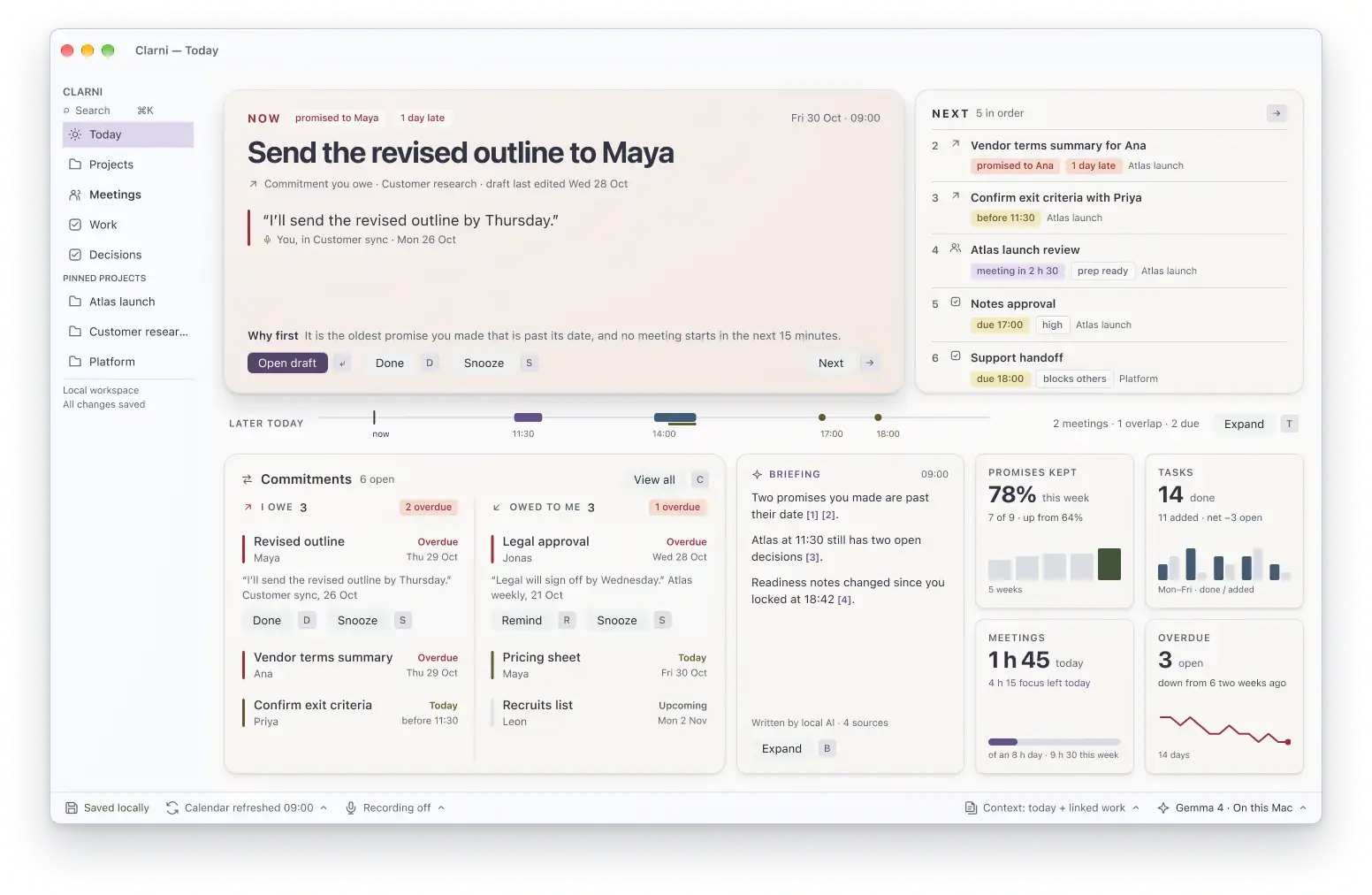
Today shows the Now priority and why it comes first, the remaining priorities in Next, and the Later Today timeline above Commitments and Briefing. Design preview, macOS Light. Illustrative example. Today’s attention queue: In private beta.Status: In private betaOpen full size design preview, 1552 by 1012 pixels
Design previewmacOS Dark
Now priority detail
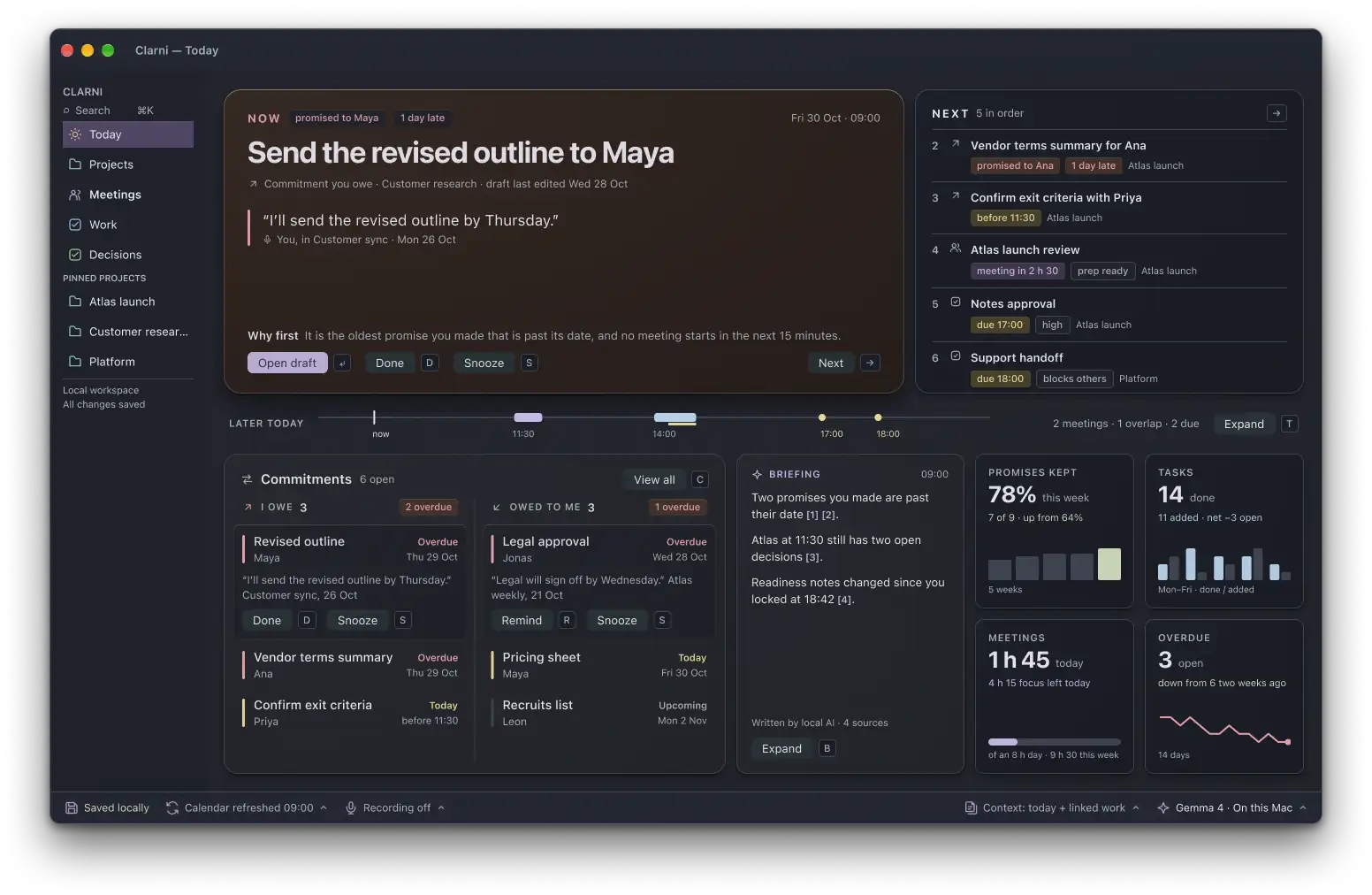
Today shows the Now priority and why it comes first, the remaining priorities in Next, and the Later Today timeline above Commitments and Briefing. Design preview, macOS Dark. Illustrative example. Today’s attention queue: In private beta.Status: In private betaOpen full size design preview, 1552 by 1012 pixels
Where Atlas launch stands
Design previewmacOS Light
Project blocker detail
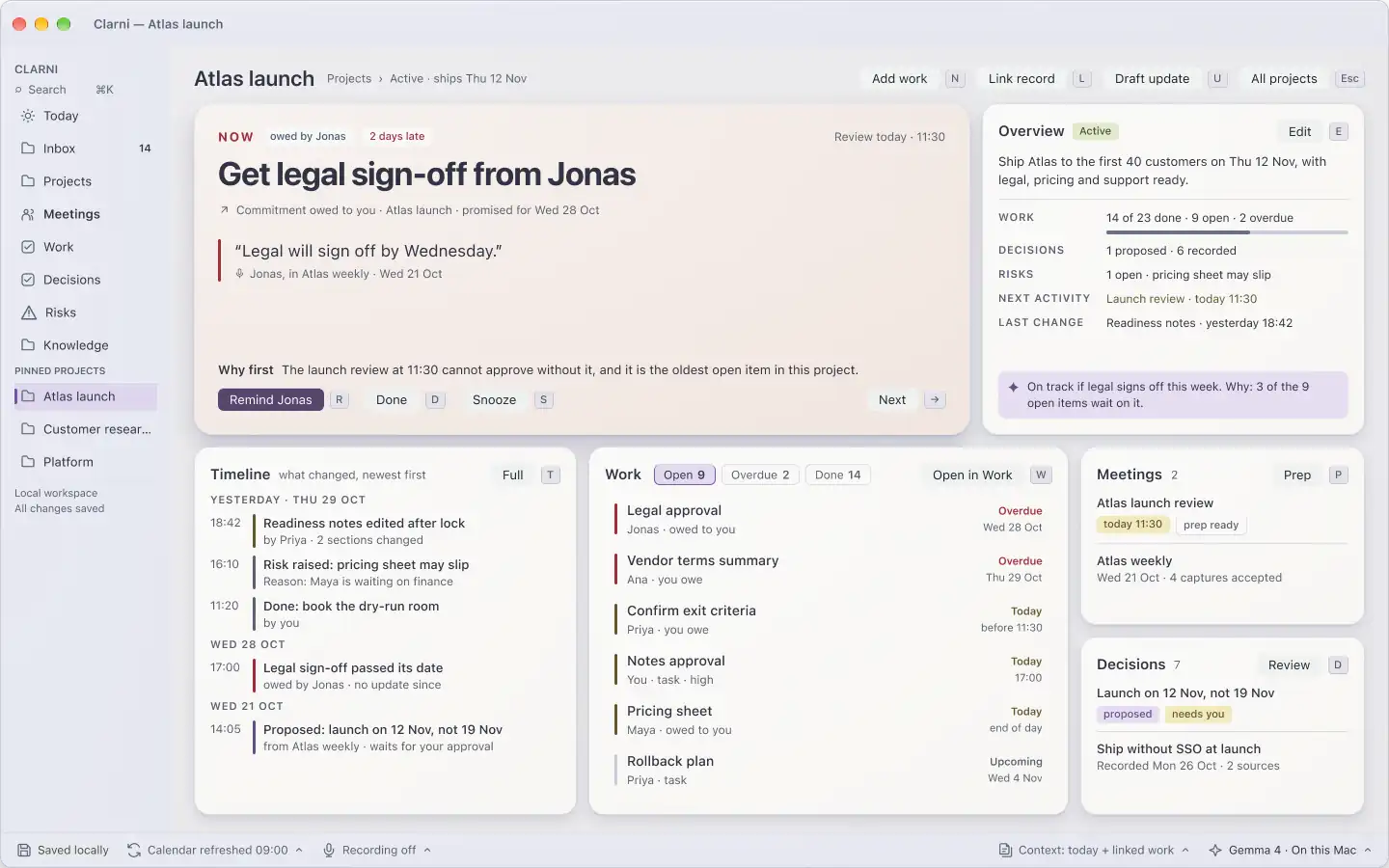
Atlas project detail highlights the overdue legal sign-off blocker. The full preview shows Overview, Timeline, Work, Meetings and Decisions. Design preview, macOS Light. Illustrative example. In private beta.Status: In private betaOpen full size design preview, 1440 by 900 pixels
Design previewmacOS Dark
Project blocker detail
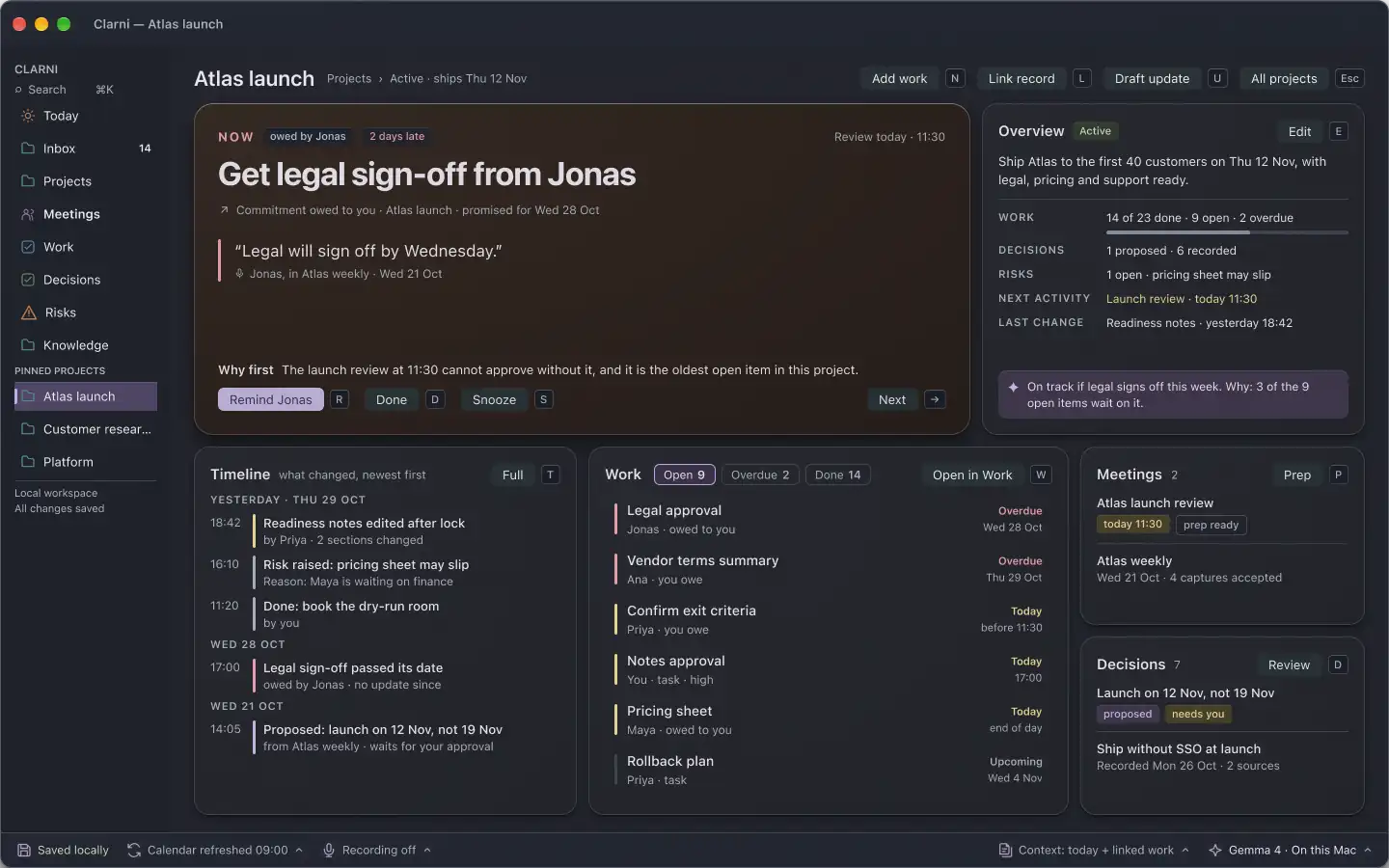
Atlas project detail highlights the overdue legal sign-off blocker. The full preview shows Overview, Timeline, Work, Meetings and Decisions. Design preview, macOS Dark. Illustrative example. In private beta.Status: In private betaOpen full size design preview, 1440 by 900 pixels
The work loopStatus: In private beta
01PrepareWalk in with what changed, what is open, and what to ask.
02Stay PresentWrite your own notes, with cited context beside them.
03ReviewWhat came out of the meeting waits as proposals.
04Follow ThroughApproved work moves forward, each item with its proof.
Section 01Prepare
In private beta
Walk in knowing what changed since last time
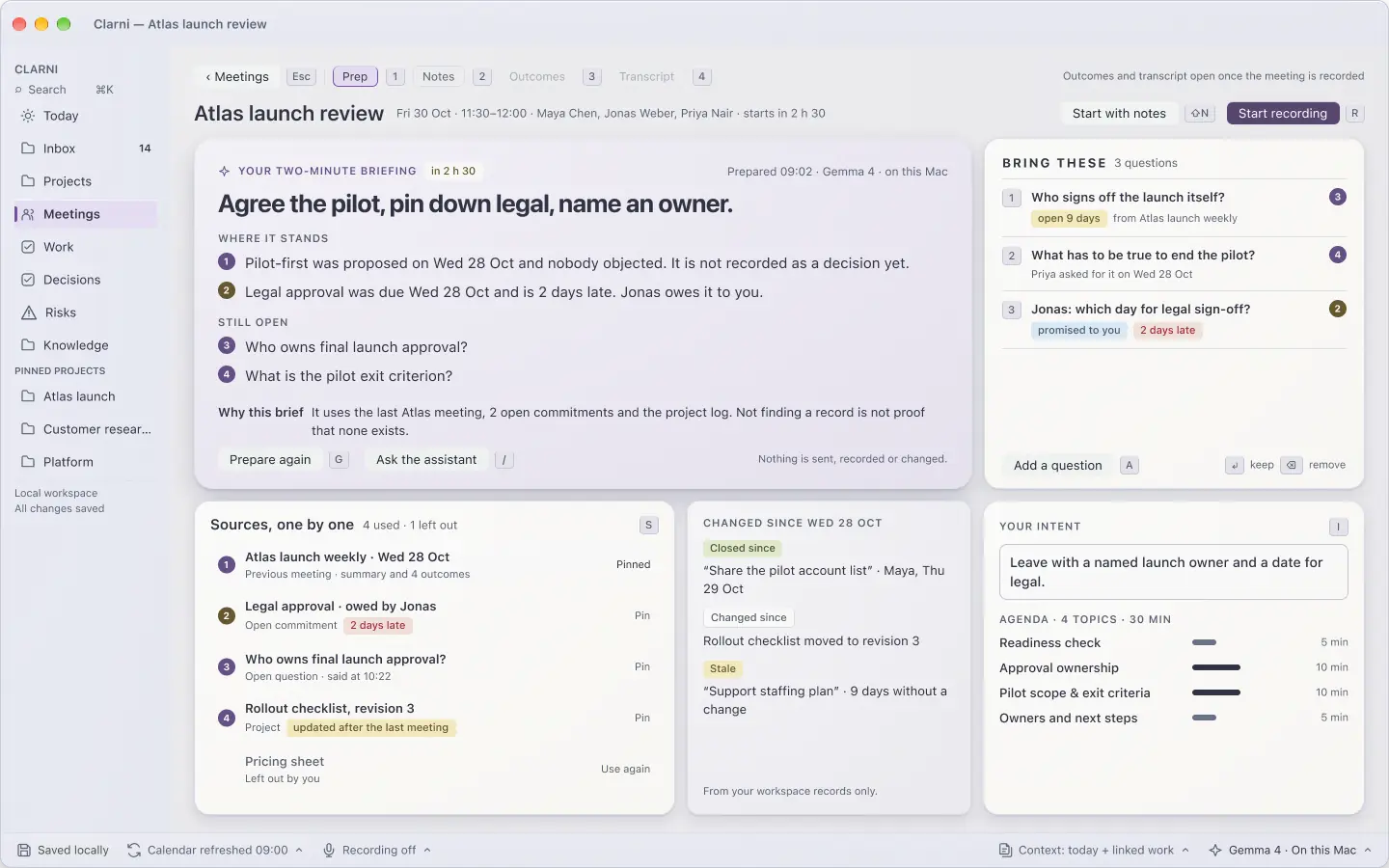
A short brief for the meeting you choose. Before the Atlas review, pilot-first is still a proposal and legal sign-off is late.
Meeting Brief
Before a meeting, a preparation brief brings back the previous meeting, open commitments and what changed since, each with its source, plus questions you can edit.Status: In private beta
You choose the context
You pick the meeting, and you can pin or remove the records the brief may read.
Since last time
The brief brings back the previous meeting and what changed since, each point with its source, rather than a story written for you.
Questions you can edit
You keep, edit, or remove the questions in the brief before the meeting starts.
Honest gaps
No match in the workspace sources is not proof that no record exists. You can add your own intent and questions.
Design previewmacOS Light
Detail — Open questions before the call
The Atlas brief shows pilot-first was proposed, not decided, and legal sign-off is late. No record found means no match in the workspace sources checked. Design preview, macOS Light. Illustrative example. In private beta.Status: In private betaOpen full size design preview, 1440 by 900 pixels
Design previewmacOS Dark
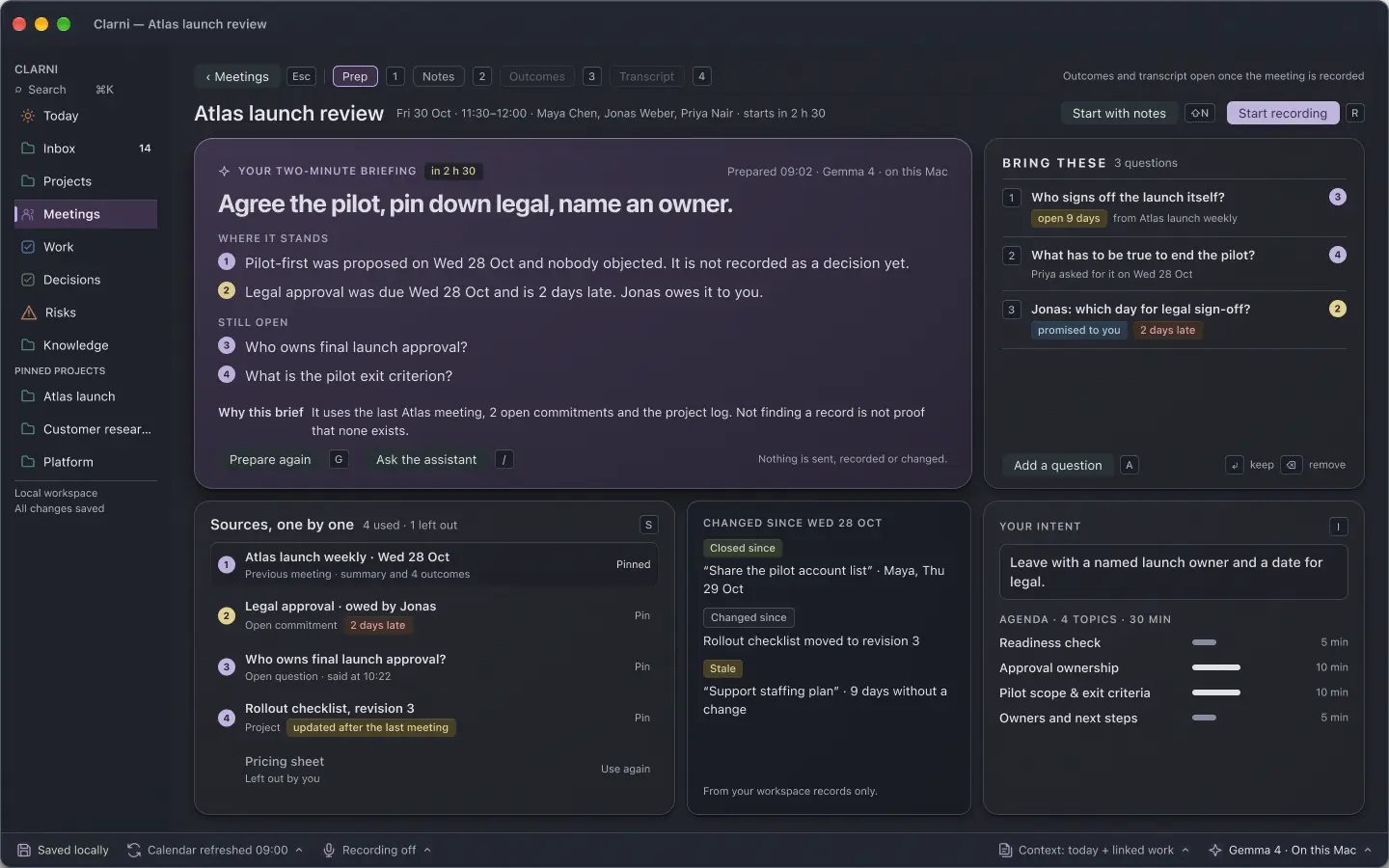
Detail — Open questions before the call
The Atlas brief shows pilot-first was proposed, not decided, and legal sign-off is late. No record found means no match in the workspace sources checked. Design preview, macOS Dark. Illustrative example. In private beta.Status: In private betaOpen full size design preview, 1440 by 900 pixels
The brief never writes to your calendar, sends an agenda, or builds a profile of the people in the meeting.
Section 02Stay Present
In private beta
Your notes stay yours, with the record beside them
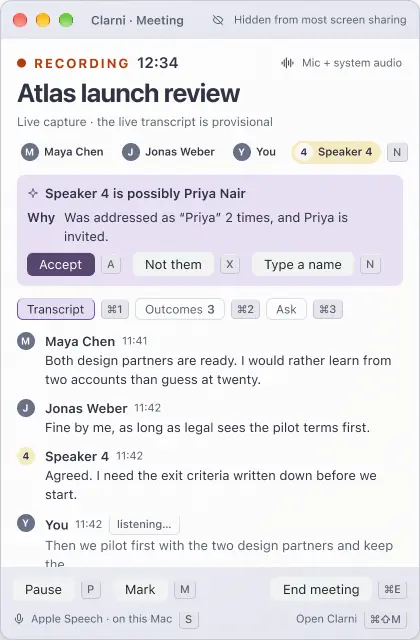
Your notes come first. In the Atlas recording preview, the transcript is provisional and a speaker label still needs review.
Notes canvas and context cards
During a meeting, your own notes stay primary: the notes work without AI or a transcript, and a context card you pin for later waits in your Review-later list.Status: In private beta
During a meeting, answers to your questions cite the transcript, and a few context cards, one to three at a time, point out a possible new commitment, a decision that differs from a confirmed one, a date or owner that differs from the record, or a question nobody has answered, each citing the transcript line.Status: In private beta
Notes come first
The notes canvas works with your notes alone, without AI or a transcript.
Ask, with citations
Preset questions such as “What have we decided so far?”, “What’s still open?”, “What did I agree to do?” and “What are the next steps?” answer from this meeting, citing the transcript lines they draw on.
Context cards, sparingly
One to three cards at a time point out a possible new commitment, a decision or date that differs from the record, or a question nobody has answered. They need the live transcript of a meeting you record; without one, notes and questions still work. Each card cites the line it came from, and you can add it to Review, pin it for later, or dismiss it.
Inserted means editable
Anything you insert becomes part of your notes, with its time in the transcript, and stays yours to change.
Design previewmacOS Light
The compact desktop window is recording the Atlas review. The transcript is provisional and a speaker label still needs review. Design preview, macOS Light. Illustrative example. In private beta.Status: In private betaOpen full size design preview, 420 by 640 pixels
Design previewmacOS Dark
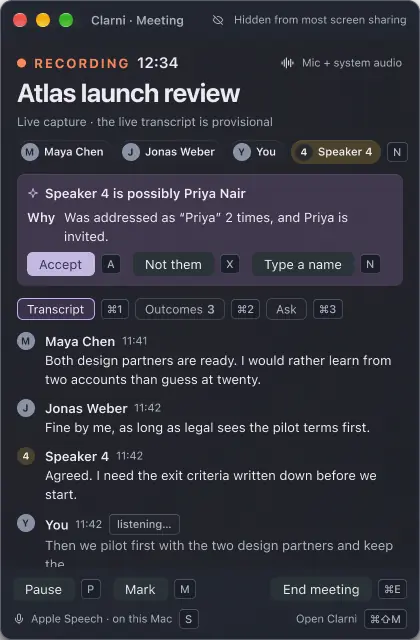
The compact desktop window is recording the Atlas review. The transcript is provisional and a speaker label still needs review. Design preview, macOS Dark. Illustrative example. In private beta.Status: In private betaOpen full size design preview, 420 by 640 pixels
Four kinds of context card, one to three at a time
New
A possible new commitment that no record holds yet.
Conflicts
A decision that differs from one you confirmed.
Changed
A date or owner that differs from the record.
Open
A question or item that nobody has answered or owns yet.
No meeting bot and no passive recording. A suggested speaker name is never applied until you accept it, and nothing scores participants or reads sentiment.
Section 03Review → Follow Through
In private beta
Review first, then the work moves forward
Review what came out of the call against its source. In the completed Atlas review, the pilot is already confirmed, but the separate legal sign-off proposal still needs review.
Review and reviewed work
When a meeting ends, a summary is written on your Mac and its outcomes arrive in Review as proposals; nothing becomes a decision, commitment, or task, and no record changes, until you approve it.Status: In private beta
Review: confirmed outcomes and open proposals
Design previewmacOS Light
Detail — Already confirmed pilot decision
Detail — Pending legal sign-off
Detail — Transcript opening at 11:44
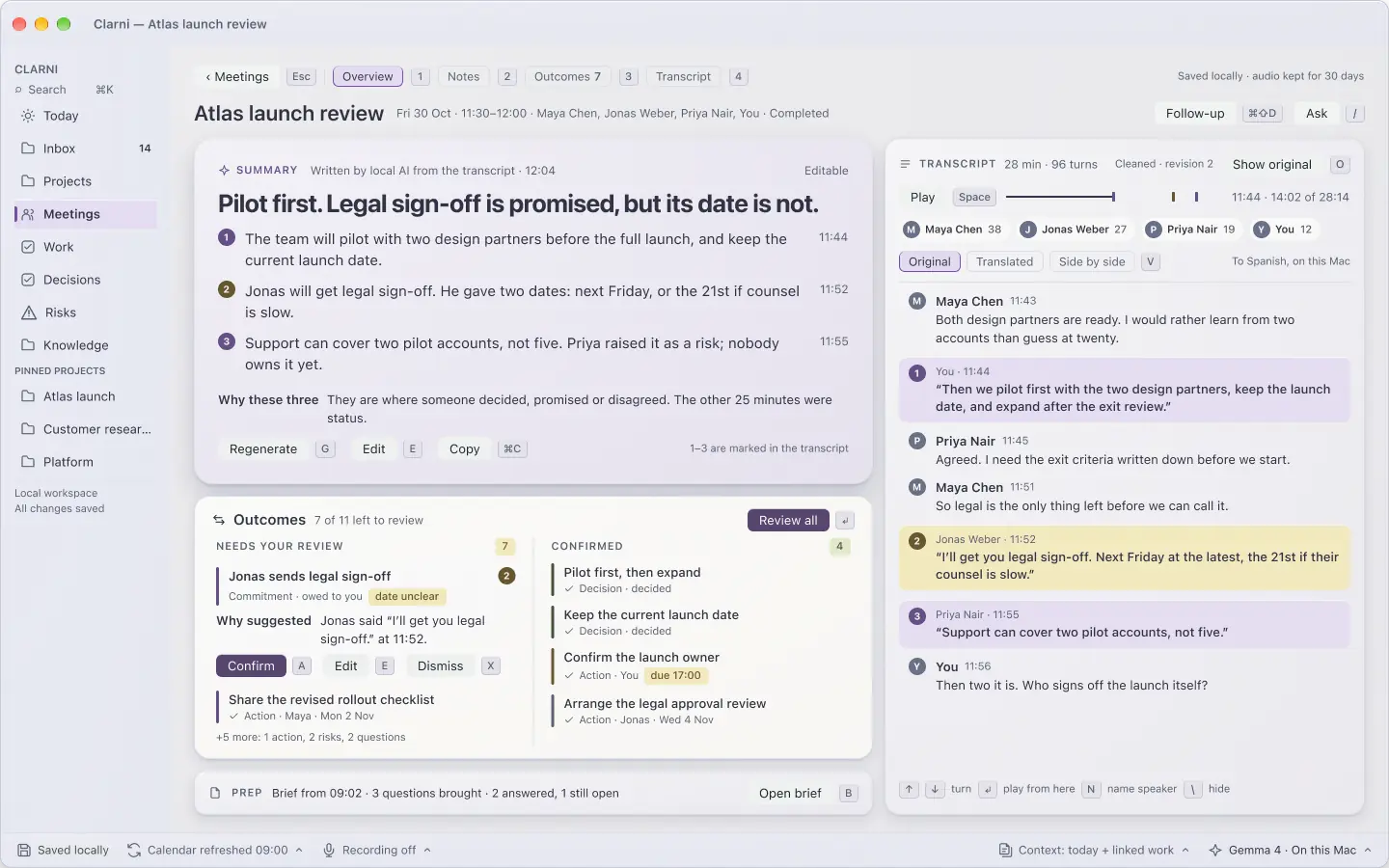
At 11:44, the transcript says: “Then we pilot first with the two design partners, keep the launch date, and expand after the exit review.” The pilot decision is already confirmed. Confirm applies to the separate 11:52 legal sign-off proposal with an unclear date. Design preview, macOS Light. Illustrative example. In private beta.Status: In private betaOpen full size design preview, 1440 by 900 pixels
Design previewmacOS Dark
Detail — Already confirmed pilot decision
Detail — Pending legal sign-off
Detail — Transcript opening at 11:44
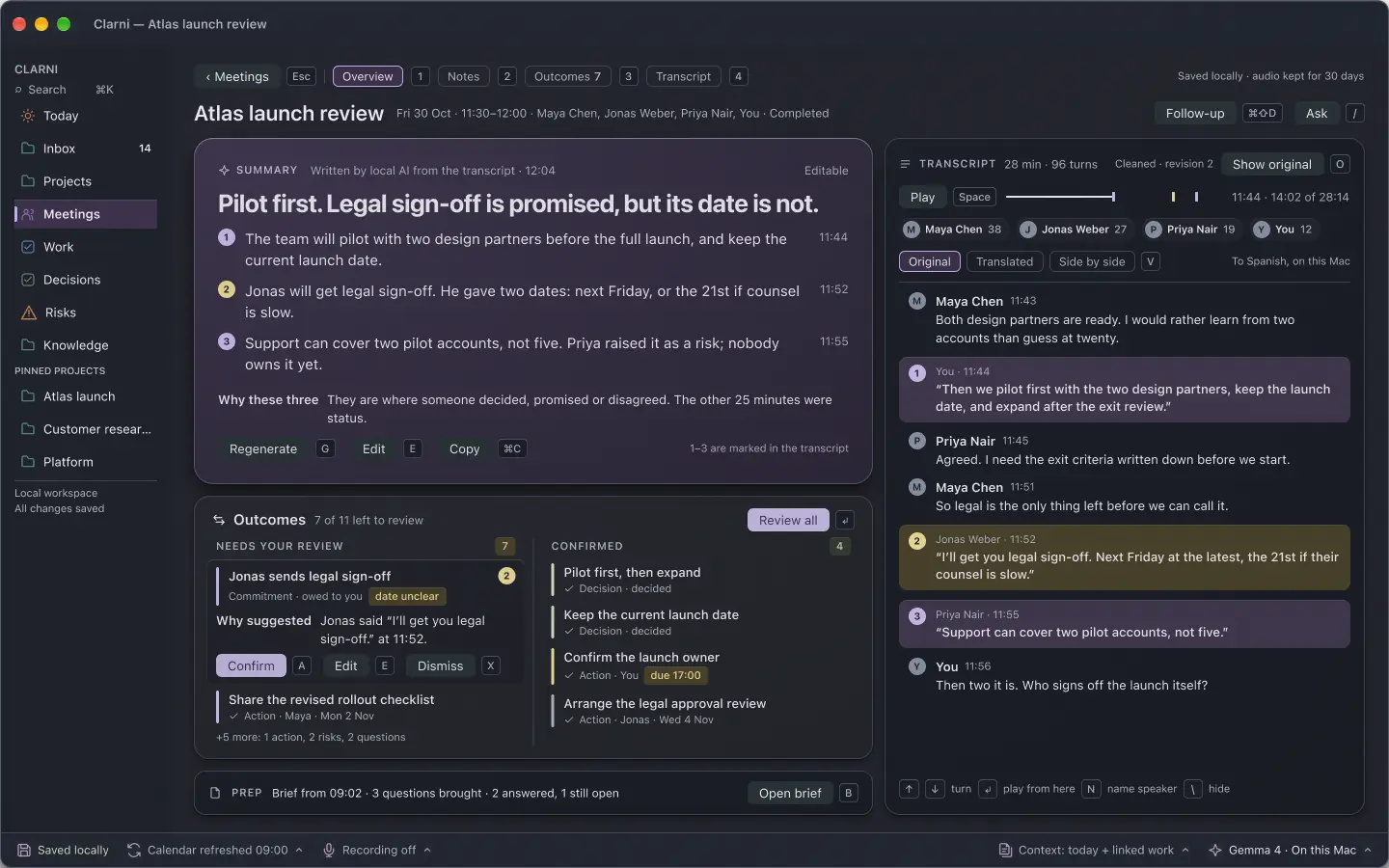
At 11:44, the transcript says: “Then we pilot first with the two design partners, keep the launch date, and expand after the exit review.” The pilot decision is already confirmed. Confirm applies to the separate 11:52 legal sign-off proposal with an unclear date. Design preview, macOS Dark. Illustrative example. In private beta.Status: In private betaOpen full size design preview, 1440 by 900 pixels
Follow through: commitments and work across projects
Design previewmacOS Light
Detail — Selected task and evidence
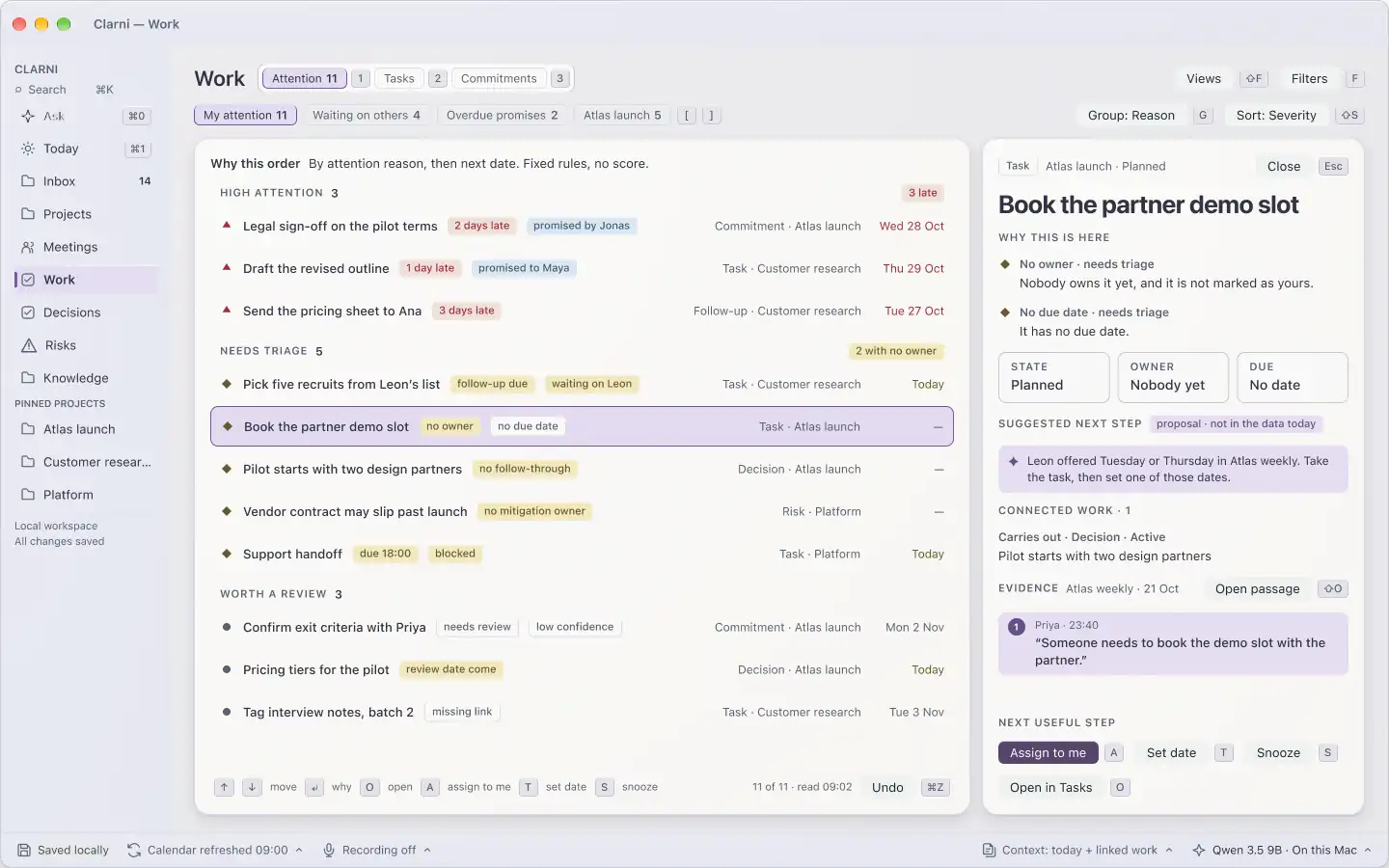
In this design, the selected task ‘Book the partner demo slot’ has no owner or due date. The pane shows the linked decision ‘Pilot starts with two design partners’ and an Atlas weekly excerpt. Suggested next step is a design proposal, not a beta feature or evidence from the record. The model label differs from the beta recommendation. Design preview, macOS Light. Illustrative example. In private beta.Status: In private betaOpen full size design preview, 1440 by 900 pixels
Design previewmacOS Dark
Detail — Selected task and evidence
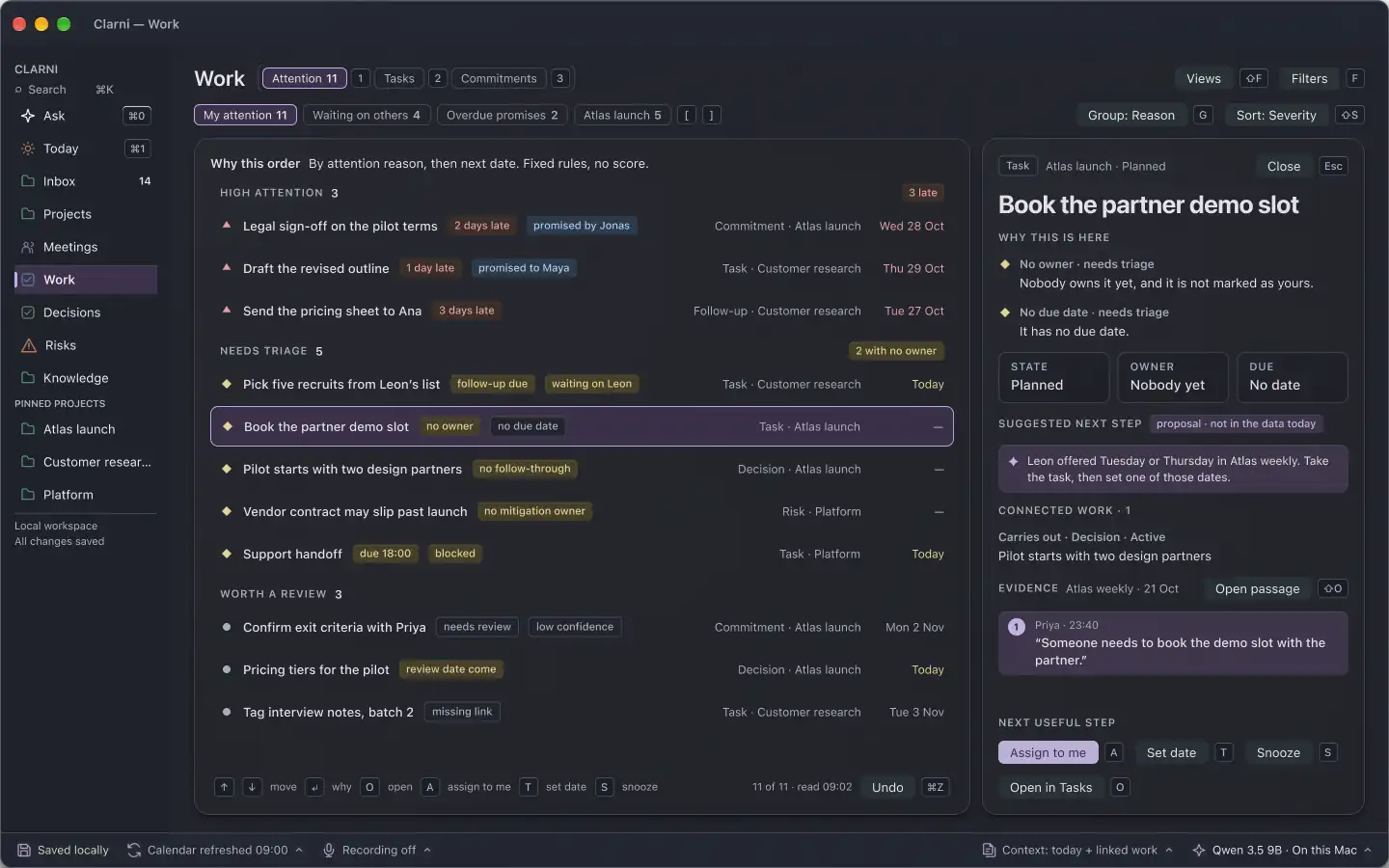
In this design, the selected task ‘Book the partner demo slot’ has no owner or due date. The pane shows the linked decision ‘Pilot starts with two design partners’ and an Atlas weekly excerpt. Suggested next step is a design proposal, not a beta feature or evidence from the record. The model label differs from the beta recommendation. Design preview, macOS Dark. Illustrative example. In private beta.Status: In private betaOpen full size design preview, 1440 by 900 pixels
From evidence to reviewed work
01
Step 1 of 4Status: In private beta
Conversations and artifacts
Meetings you record, notes, and text you choose to bring in. Recordings are an input, never the product.
02
Step 2 of 4Status: In private beta
Evidence-linked decisions, commitments, tasks, and risks
Clarni turns what you capture into proposed decisions, commitments, tasks, and risks that each point back to their source, and you confirm each one.
03
Step 3 of 4Status: In private beta
A trustworthy current project state
What is true now across decisions, commitments, tasks, and risks, with the history of what changed and when.
04
Step 4 of 4Status: In private beta
Reviewed follow-through and approved communication
Clarni can draft a follow-up from a follow-up you are tracking or from a meeting's confirmed outcomes, on the local model; the draft stays editable on your device and you copy it out yourself.
Proposals, not records
AI-suggested commitments and tasks are proposals you review first; Clarni does not silently assign obligations.Status: In private beta
Each item keeps its proof
Each decision, commitment, or task can show the source it came from, such as the passage it was taken from or a meeting transcript excerpt with its timestamp.Status: In private beta
Nothing goes out without you
Clarni sends nothing to an email, chat, or document system on its own: in the private beta it has no way to send at all, and a draft leaves only when you copy it.Status: In private beta
Clarni never creates a record or changes one without your approval, and in the private beta it cannot contact anyone.
AI is designed to help you find, compare, and prepare; you decide. Here is what AI is designed to do, where your work data lives in the private beta, and the two gates planned for it to pass through.
AI in Clarni retrieves, compares, suggests questions, drafts, and proposes; what it produces stays a proposal you can inspect and edit, and in the private beta it cannot send anything to another system.Status: In private beta
Your deviceprivate beta
Work data, encrypted
Conversations
Documents
Decisions
Commitments
Drafts
Model server (network or cloud)opt-in
Opens only after you allow that server for a feature; each request is shown to you first until you choose to always allow it.
Email, chat, documentsconfirm
Opens only after your explicit confirmation, immediately before anything is sent.
Diagram of the boundary for the desktop app. In the private beta work data stays on the device, encrypted. The model-server gate opens only for a server you added and allowed, per feature. The gate to email, chat, and documents is planned and stays closed: Clarni cannot send to those tools. The privacy page lists what the beta app does send.Status: Planned
In the private beta, your workspace stays on your own device, encrypted with your passphrase, and Clarni's AI runs on your Mac by default. Local by default. Nothing leaves your Mac unless you allow it.Status: In private beta
In the private beta, AI actions run on the local model on your Mac unless you add a model server: one on your Mac is used without asking, unless the model it serves runs in the cloud, and one on your network or in the cloud is used for a feature only after you allow it, with each request shown to you first until you choose to always allow it. A meeting you recorded is summarised when it ends, on by default, and you can turn that off.Status: In private beta
Clarni sends nothing to an email, chat, or document system on its own: in the private beta it has no way to send at all, and a draft leaves only when you copy it.Status: In private beta
Local-first does not mean offline-only, and it is not an absolute promise. Clarni goes online to check for updates and to fetch the local model when you ask, and usage data goes out only if you turn it on. AI runs on your Mac unless you add a model server; one on your network or in the cloud is used only for a feature you allow, after you see what will be sent, until you choose to always allow it.
Clarni works alongside your existing tools rather than replacing your task tracker, email, or documents: you bring work in by typing, pasting, recording or importing a calendar file, and take drafts out by copying them.Status: In private beta
This describes the desktop app. What this website collects when you visit or request early access is a separate matter, described on the privacy page.
Clarni is early. Its private beta is opening to invited testers, and every part of it on this page carries its status.
The private beta
Clarni is a desktop app in a private beta opening to invited testers, on Macs with Apple silicon. It is not open to everyone.
Status: In private beta
The meeting loop
The preparation brief, your notes, cited questions, context cards, review after the meeting, and the meeting window are in the private beta.
Status: In private beta
The trust boundary
Your workspace stays on your device, encrypted, and AI runs on your Mac. Clarni cannot send to your email, chat or documents. Local by default. Nothing leaves your Mac unless you allow it.
Status: In private beta
Windows and Linux
Windows and Linux versions are being built.
Status: In development
How we describe Clarni
The position on this page and who it is for are what we are testing with early-access conversations. They are not a product promise.
Status: Design direction
Early access requestStatus: Design direction
Ask to be considered for early access, and say whether you would like to test the beta.
A request is not a guarantee of a place in the private beta, or of a date. It tells us you are interested, and we may get in touch.
This website collects only what you submit in the early-access request and the minimal technical data needed to run and protect the site. See the privacy page.
Section 06Questions
In private beta
Three questions people ask first
Is this just another AI notetaker?
No. Notes and transcripts are an input. The product is the current state of decisions, commitments, tasks, and risks, with the proof behind each one. Clarni turns what you capture into proposed decisions, commitments, tasks, and risks that each point back to their source, and you confirm each one.
Status: In private beta
Where does my client data go?
In the private beta, your workspace stays on your own device, encrypted with your passphrase, and Clarni's AI runs on your Mac by default. Local by default. Nothing leaves your Mac unless you allow it. In the private beta, AI actions run on the local model on your Mac unless you add a model server: one on your Mac is used without asking, unless the model it serves runs in the cloud, and one on your network or in the cloud is used for a feature only after you allow it, with each request shown to you first until you choose to always allow it. A meeting you recorded is summarised when it ends, on by default, and you can turn that off.
Status: In private beta
Can I try it now?
Only as an invited tester. Clarni’s private beta, on Macs with Apple silicon, is opening to invited testers. It is not open to everyone, and no release date is promised. To ask, request early access and say you would like to be a beta tester. A request is not a guarantee of a place in the beta, or of a date.